Showing posts with label netbeans rcp. Show all posts

Saturday, April 2, 2011

NetBeans Database Explorer API and databases in NetBeans

At the recent NetBeans Platform Certified Training organized by Visitrend we were discussing how to work w/ the built in database functionality. NetBeans ships w/ a pretty decent database/SQL functionality out of the box - you can connect to any JDBC compliant database, add your drivers, sling queries, edit the results. It even has code completion for SQL queries - up until SQL Server 2005 it even provided better support for SQL code authoring than the built in Management tools ( and it is still better than the standard Mysql console).


Now, it turns out that for data driven applications, it is a pretty common occurrence that the users need to connect to a database. Sometimes it makes sense to hide the details of the database; at the same time, when you're dealing with sophisticated that have intimate knowledge of the underlying database schema and need to be able to deal with the underlying data, hiding the fact that they're dealing with a database just doesn't make sense. In our case, we have a team of QA Engineers who need to be able to look into all aspects of the database behind the application, so the best a tool can do is to make the setup and access to the database as easy and transparent as possible.

Thus, to solve this problem, my users need the following :
1. Make sure that the IDE has the proper drivers set up to access our test databases
2. Easy setup of the database connection with the details for a specific project/system under tes

Automatically setting up JDBC driver

Unfortunately, Microsoft's SQL Server is not one of the JDBC drivers that ships with the IDE. A new user could just navigate to the "Drivers" node in the "Services" top component and walk through the wizard to register a new driver. This can certainly be an extra step in the list of "setup instructions". But, why should a user have to remember to do that if we can do it in a module. Thus, the first hurdle we need to overcome is have a module that automatically registers the JDBC driver in the IDE :

1. First, we need to  provide the MSSQL JDBC driver.

For that, I created a new Library Wrapper module. I wanted to mention this because for whatever reason when I tried providing the JDBC driver and the XML registration below in the same module, it failed to find the JDBC driver.


In the general case for a pure JDBC driver, this should be enough. However, in order to support windows authentication, the JDBC driver needs to have a   dll included on the path. In order to sutpport jars that need native libraries, the native library needs to be placed in the release/modules/lib as indicated on Modules API Javadoc


2. Create a second module for the actual driver registration.

Add an XML descriptor for registering new drivers (named SQLServer2008Driver.xml). For MSSQL it looks like this :


<?xml version='1.0'?>
<!DOCTYPE driver PUBLIC '-//NetBeans//DTD JDBC Driver 1.1//EN' 'http://www.netbeans.org/dtds/jdbc-driver-1_1.dtd'>
<driver>
<name value='SQLServer2008'/>
<display-name value='Microsoft SQL Server 2008'/>
<class value='com.microsoft.sqlserver.jdbc.SQLServerDriver'/>
<urls>
<url value="nbinst:/modules/ext/sqljdbc4.jar"/>
</urls>
</driver>


I am not entirely sure of the meaning of the nbinst: prefix, but this works.

3. Add an entry into the layer.xml file of the second module to add the driver registration XML : 


Unfortunately, in the case of the MSSQL JDBC driver just adding the dll into the module doesn't cut it as it appears that the SQL Server driver also depends on other DLLs, so it actually needs to be in c:\windows\system32 . Thus, adding the jdbc driver dll would have been not needed, as the dll needs to be copied to windows\system32 directory. To do that, register a module installer  :


public class MssqlDriverInstaller extends ModuleInstall {

    @Override
    public void restored() {
        File mssqlJdbcDll = new File(System.getenv("windir"), "system32\\sqljdbc_auth.dll");
        boolean foundDll = mssqlJdbcDll.exists();
       
        if (!foundDll) {
            FileOutputStream system32MssqlDll = null;
            InputStream bundledDll = null;
            try {
                system32MssqlDll = new FileOutputStream(mssqlJdbcDll);
                bundledDll = MssqlDriverInstaller.class.getResourceAsStream("sqljdbc_auth.dll");
                System.out.println("Copying sqljdbc_auth.dll to windows system32");
                FileUtil.copy(bundledDll, system32MssqlDll);

            } catch (IOException ex) {
                Logger.getLogger(MssqlDriverInstaller.class.getName()).log(Level.SEVERE, null, ex);
            } finally {
                try {
                    system32MssqlDll.close();
                } catch (IOException ex) {
                    Logger.getLogger(MssqlDriverInstaller.class.getName()).log(Level.SEVERE, null, ex);
                }
                try {
                    bundledDll.close();
                } catch (IOException ex) {
                    Logger.getLogger(MssqlDriverInstaller.class.getName()).log(Level.SEVERE, null, ex);
                }
            }
        }
    }
}


Automatically connecting to the database


Now, the last step is, how to automate the creation of the database connection node now that we can now be sure that the IDE has the right driver to connect to the database: (the APIs used below are from the Database Explorer API, org.netbeans.api.db.explorer)  


public void createProjectConnection(DatabaseConfig dbc) {

        DatabaseConfig dbConfig = dbc;
        if (dbConfig == null) {
            dbConfig = DatabaseConfig.getDefault();
        }

        JDBCDriver sqlSrvDrv = findSqlServerDriver();

        if (sqlSrvDrv != null) {
            try {
                DatabaseConnection dbConn = createDbConnection(dbConfig, sqlSrvDrv);

                final ConnectionManager connMgr = ConnectionManager.getDefault();
                DatabaseConnection foundConn = findSameConnection(dbConn);
                if (foundConn == null) {
                    foundConn = dbConn;
                    connMgr.addConnection(dbConn);
                }

                final DatabaseConnection dbConn2 = foundConn;
                RequestProcessor.getDefault().post(new Runnable() {

                    @Override
                    public void run() {
                        try {
                            connMgr.connect(dbConn2);
                            connMgr.selectConnectionInExplorer(dbConn2);
                        } catch (DatabaseException ex) {
                            Logger.getLogger(Ats3ProjectDataService.class.getName()).log(Level.SEVERE, "Failed to connect to database", ex);
                        }
                    }
                });

            } catch (DatabaseException ex) {
                Logger.getLogger(Ats3ProjectDataService.class.getName()).log(Level.SEVERE, "Failed to connect to database", ex);
            }
        }
    }

    private DatabaseConnection createDbConnection(DatabaseConfig dbConfig, JDBCDriver sqlSrvDrv) {
        DatabaseConnection dbConn;
        String url = null;
        String userDb = dbConfig.getName();
        if (userDb != null) {
            if (userDb.contains("${username}")) {
                userDb = userDb.replace("${username}", System.getProperty("user.name"));
            }
        } else {
            userDb = System.getProperty("user.name") + "_sb_rc";
        }
        if (!dbConfig.getUseSqlAuth()) {
            url = String.format("jdbc:sqlserver://%s:1433;databaseName=%s;integratedSecurity=true", dbConfig.getServer(), userDb);
            dbConn = DatabaseConnection.create(sqlSrvDrv, url, "", "dbo", "", true);
        } else {
            url = String.format("jdbc:sqlserver://%s:1433;databaseName=%s", dbConfig.getServer(), userDb);
            dbConn = DatabaseConnection.create(sqlSrvDrv, url, dbConfig.getUser(), "dbo", dbConfig.getPassword(), true);
        }
        return dbConn;
    }

    private JDBCDriver findSqlServerDriver() {
        JDBCDriver sqlSrvDrv = null;
        JDBCDriver[] drivers = JDBCDriverManager.getDefault().getDrivers("com.microsoft.sqlserver.jdbc.SQLServerDriver");
        // we know that there should be at least one as this module registers it
        for (JDBCDriver drv : drivers) {
            if ("SQLServer2008".equals(drv.getName())) {
                sqlSrvDrv = drv;
            }
        }
        return sqlSrvDrv;
    }

    private DatabaseConnection findSameConnection(DatabaseConnection dbConn) {
        DatabaseConnection foundConn = null;
        ConnectionManager connMgr = ConnectionManager.getDefault();
        for (DatabaseConnection dbc : connMgr.getConnections()) {
            if (dbc.getDatabaseURL().equals(dbConn.getDatabaseURL())) {
                foundConn = dbc;
            }
        }

        return foundConn;
    }

Wednesday, June 13, 2007

I posted the same message to the NetBeans users mailing list and so far I haven't gotten any responses on it (http://www.netbeans.org/servlets/ReadMsg?list=nbusers&msgNo=93210). I'm re-posting it here again, just in case somebody follows my blog and maybe has ideas about how this is handled best ...

----------------- NetBeans Users maling list post ----------

Can anybody point me to any resources that describe best practices in
managing dependencies between multiple NetBeans modules and suites ?

Overall, here is my problem:

I have a module suite (e.g. MySuite1) that uses a couple of external
libraries e.g. foo1.jar and foo2.jar . I know that NB provides a library
wrapper module, so, I create library wrappers for each one of these
external jars e.g. foo1-lib and foo2-lib . As I understand, when I create
the library wrapper modules, the foo1.jar and foo2.jar are copied into a
private directory for the module e.g.
${foo1-lib}/release/modules/ext/foo1jar .

Then, I create a second module suite : MySuite2, which happens to need the
same two external jars.
- Should I create 2 new library wrapper modules for foo1.jar and foo2.jar
so that I can add the new library wrapper modules to MySuite2, or should I
just use the library wrapper modules that I created for MySuite1 ?
- The problem there is that if I don't create new library wrapper modules
and simply add foo1-lib and foo2-lib modules to MySuite2, then they will
be removed from MySuite1 (and when I want to work on MySuite1, I have to
move them back to MySuite).
- If I create new library wrapper modules for MySuite2 (e.g. foo1-lib2
and foo2-lib2 modules), then there is going to be yet another copy of the
original jars in the new module's releas/modules/ext/foo1.jar, which then
becomes a pain to manage (e.g. if a jar is used in 10 different modules,
each one will have a private copy. Then if I build a new version of the
jar, I need to update all 10 private copies in each module).
- Finally, if I have multiple modules in different suites wrapping the
same jar, if I install 2 different modules suites into the same IDE, amd I
going to have multiple copies of the same jar, or will the IDE figure out
that they are the same (e.g. if all have the same version numbers and code
name base) and only install one of them ?

I would appreciate any tips on how this is handled best.

Saturday, September 9, 2006

NetBeans module development book

Geertjan is on a roll: he just posted the first chapter of the NetBeans module development book on his blog. He always surpises me by his posts and always makes me say " I wish I had this when I was doing my stuff so that I wouldn't have spent as much time figuring things out on my own".

The first book on NetBeans that I've read is about NetBeans 3.5. Although that was really nice in getting me up to speed on NetBeans at the time, a lot of the things in it (especially on the module development side) don't really apply. It is a really nice book to help you understand the inner workings of NetBeans; however, at the same time, a lot of the inner workings have changed and it becomes pretty difficult to figure out on your own which one of the things in that book are still valid, and which ones aren't. From that perspective, the book that Geertjan has started would be invaluable in that respect.

Since this (hopefully) last semester I would try to focus a lot on my thesis project (which has to do with J2ME mobile video), I probably wouldn't have much time to spend on digging around the NetBeans APIs and trying to figure them out on my own. At the same time, if Geertjan continues to write this book, I could probably try to write a "parallel" set of examples that do the same things that he illustrates for Wicket and Click for Tapestry.

Sunday, August 20, 2006

Tapestry NetBeans Plugin

This is repost of my original post - since it was linked by Geertjan and NetBeans weekly news at two different URLs, here it goes...:

I've read up a bit on Tapestry and I've followed Geertjan's blog for quite a while now. I've been a NetBeans fan for quite a while now (since 3.5), and Geertjan's blog has been really eye opening in what is possible with NetBeans. So, a while back, he was really excited about Wicket, and he started working on a plugin for developing Wicket apps in NetBeans. It appears that in the last few months, with the help of Petr they've built quite a nice set up to support Wicket in NetBeans.

What that means about me is that I will try to do something similar, but with Tapestry. What I will try to do is to develop a plugin that will support Tapestry development in NetBeans. Geertjan has already done most of the work here as he has covered a lot of the topics that are required to build a nice web framework support plugin for NetBeans. At the same time, as he seems to point out in one of his latest entries, the information that is required to build such a plugin is either scattered all over the net (or the NetBeans.org site), or is in the source code for his Wicket support plugin . Now that I'm trying to organize my thoughts about this project better, I start noticing that he's also done a great job of documenting his work and his progress along the way. However, I guess giving it a second run wouldn't hurt anyone.

I will probably try to put up a post that would list the proposed features for such a plugin. However, the idea is that the plugin should make working with Tapestry easier, maybe even to the point of not having to know all the nitty-gritty details of exactly how Tapestry works. It should probably have all the nice features of the Wicket plugin, translated into the Tapestry world.

One thing that I've considered in the past is to dig into the Spindle project (which is an Eclipse Tapestry support plugin which has an Eclipse specific and an Eclipse agnostic part) and try to adapt it to work for NetBeans. Now, the thing is that part of my goals includes learning the NetBeans APIs along the way. So, while sometime down the road, looking into using the Spindle implementation and putting up a NetBeans frontend to it would make sense, it appears that for now it would make the most sense to see about implementing the basics in NetBeans only...

I will also probably post more details on the steps required to accomplish this; however, after a few hours of playing around with NetBeans, the tutorials on the site, Geertjan's tutorials, as well as the NetBeans APIs, I've put together the first few things for the plugin... Here are a couple of screenshots that just give me an enormous adrenaline rush...


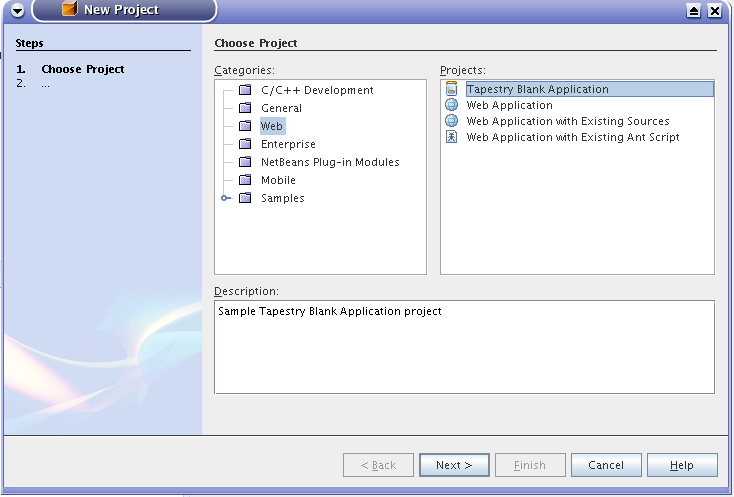
First, a blank Tapestry project, set up and ready to go (I wish I knew how to do this a while back at work, as with both Tapestry and JSF/Facelets I've always kept referring to a sample project that I know it works when I've done new projects...):


Geertjan is probably going to laugh at this one as this is dirt simple to do, but damn, it is nice to be able t accomplish this.


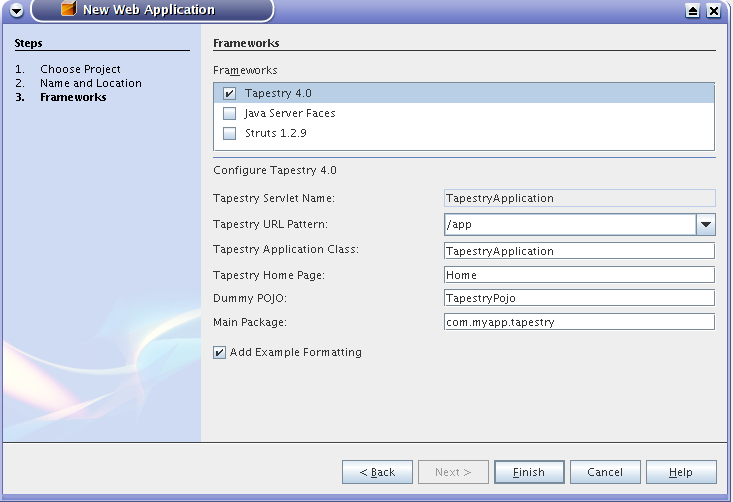
The next one is showing how the Tapestry framework is added to the list of supported frameworks in a standard NetBeans web project. I admit right off the bat that I took all the code from the Wicket plugin and replaced all references to Wicket with references to Tapestry. I still need to remove some of the config options here that really have nothing to do with Tapestry, but this is a very nice start (I was initially having some trouble getting the framework support in - I spent a good number of hours until I found out exactly how to register the framework in the IDE).


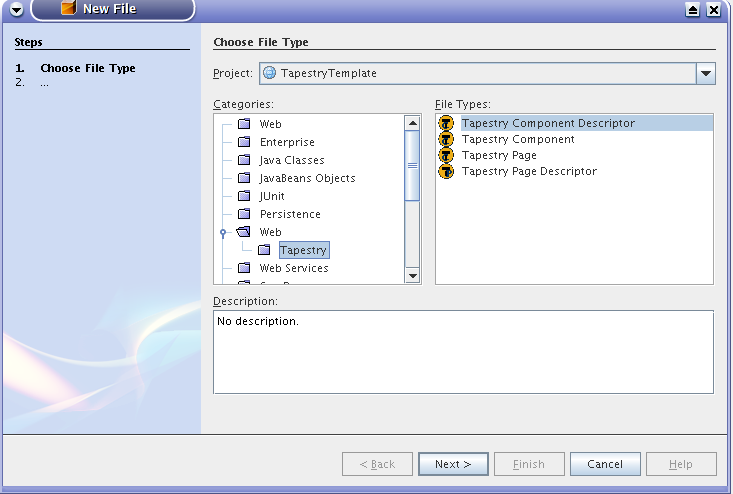
The last one is a list of a couple of new file types added to a project. Most likely, I will have to restrict them to Tapestry projects only, but it's a nice start again. THere is more work to be done to maybe create a graphical customizer for a Tapestry page, but still.. I'm pumped.. :-)


Thursday, July 20, 2006

Tapestry NetBeans plugin

I've read up a bit on Tapestry and I've followed Geertjan's blog for quite a while now. I've been a NetBeans fan for quite a while now (since 3.5), and Geertjan's blog has been really eye opening in what is possible with NetBeans. So, a while back, he was really excited about Wicket, and he started working on a plugin for developing Wicket apps in NetBeans. It appears that in the last few months, with the help of Petr they've built quite a nice set up to support Wicket in NetBeans.

What that means about me is that I will try to do something similar, but with Tapestry. What I will try to do is to develop a plugin that will support Tapestry development in NetBeans. Geertjan has already done most of the work here as he has covered a lot of the topics that are required to build a nice web framework support plugin for NetBeans. At the same time, as he seems to point out in one of his latest entries, the information that is required to build such a plugin is either scattered all over the net (or the NetBeans.org site), or is in the source code for his Wicket support plugin . Now that I'm trying to organize my thoughts about this project better, I start noticing that he's also done a great job of documenting his work and his progress along the way. However, I guess giving it a second run wouldn't hurt anyone.

I will probably try to put up a post that would list the proposed features for such a plugin. However, the idea is that the plugin should make working with Tapestry easier, maybe even to the point of not having to know all the nitty-gritty details of exactly how Tapestry works. It should probably have all the nice features of the Wicket plugin, translated into the Tapestry world.

One thing that I've considered in the past is to dig into the Spindle project (which is an Eclipse Tapestry support plugin which has an Eclipse specific and an Eclipse agnostic part) and try to adapt it to work for NetBeans. Now, the thing is that part of my goals includes learning the NetBeans APIs along the way. So, while sometime down the road, looking into using the Spindle implementation and putting up a NetBeans frontend to it would make sense, it appears that for now it would make the most sense to see about implementing the basics in NetBeans only...

I will also probably post more details on the steps required to accomplish this; however, after a few hours of playing around with NetBeans, the tutorials on the site, Geertjan's tutorials, as well as the NetBeans APIs, I've put together the first few things for the plugin... Here are a couple of screenshots that just give me an enormous adrenaline rush...


First, a blank Tapestry project, set up and ready to go (I wish I knew how to do this a while back at work, as with both Tapestry and JSF/Facelets I've always kept referring to a sample project that I know it works when I've done new projects...):


Geertjan is probably going to laugh at this one as this is dirt simple to do, but damn, it is nice to be able t accomplish this.


The next one is showing how the Tapestry framework is added to the list of supported frameworks in a standard NetBeans web project. I admit right off the bat that I took all the code from the Wicket plugin and replaced all references to Wicket with references to Tapestry. I still need to remove some of the config options here that really have nothing to do with Tapestry, but this is a very nice start (I was initially having some trouble getting the framework support in - I spent a good number of hours until I found out exactly how to register the framework in the IDE).


The last one is a list of a couple of new file types added to a project. Most likely, I will have to restrict them to Tapestry projects only, but it's a nice start again. THere is more work to be done to maybe create a graphical customizer for a Tapestry page, but still.. I'm pumped.. :-)


Popular Posts

Related Posts with Thumbnails